
A steam shower feels simple from the inside. You press a button, warm steam fills the room, and you relax. Behind that button, though, sits a control system that decides how hot the room gets, how long the steam runs, and when the generator shuts itself off.
Smart steam controls are the modern version of that system. They add timers you can set precisely, touchscreens with saved profiles, and in some cases an app on your phone that starts the steam before you step in. This guide explains what each feature does, which safety functions matter most, and how to choose and set up a control for a home steam generator.
Please read first: This article is general guidance only, not medical advice. Steam rooms are wellness tools, not treatments. If you are pregnant, live with a heart or circulation condition or low blood pressure, or take medication that affects heat tolerance, check with a doctor before using a steam room. Electrical and plumbing work for a steam generator must be done by a licensed electrician and plumber, and you should check your local code and permit rules before any installation.


Paid Links - As an Amazon Associate, I earn from qualifying purchases.
What Smart Steam Controls Actually Do
Every steam generator needs a control. At its simplest, the control turns the generator on and off and sets a temperature. A smart control does the same job with more precision and more safeguards, and it adds features that a basic push-button panel cannot offer.


Paid Links - As an Amazon Associate, I earn from qualifying purchases.
The core jobs of any steam control are the same. It reads the room temperature from a sensor, tells the generator when to make steam, and stops the session when the timer runs out. Smart controls add a screen that shows time remaining, saved settings for each person in the household, and in some models a phone app or a scheduled start time.
It helps to separate the marketing words from the real functions. A control is only as smart as its safety features. A bright touchscreen means little if the timer can be bypassed or the generator keeps running after you leave. The sections below start with the features that protect you, then move to the conveniences.
The Four Kinds of Steam Controls
Steam generator controls fall into four broad types. Most homes have one of the first two. The last two add the features this article focuses on, and they usually cost more and need a compatible generator.
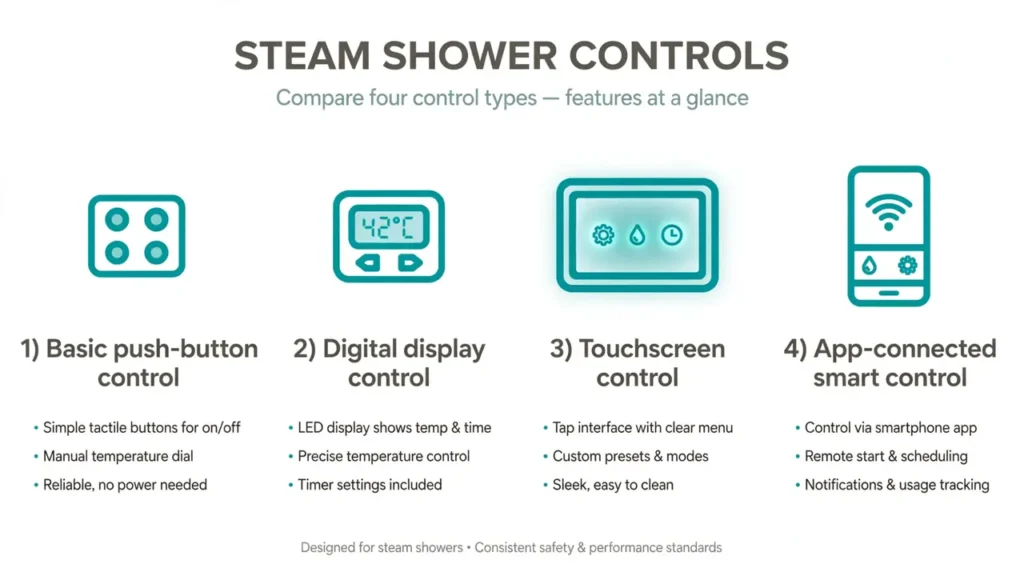
| Control type | What you get | Timer | Best for |
|---|---|---|---|
| Basic push-button | On, off, temperature up and down | Fixed or simple dial timer | Simple setups and tight budgets |
| Digital display | Digital temperature readout, time remaining | Adjustable, often up to 60 minutes | Most home steam rooms |
| Touchscreen | Touch display, saved profiles, passcode lock | Programmable, often 1 to 60 minutes | Shared family bathrooms |
| App-connected smart control | Phone control, schedules, remote start, diagnostics | Programmable plus scheduled starts | Households that want remote start and presets |
Basic push-button controls
A push-button control is the simplest option. It has an on and off button and a way to raise or lower the temperature. Some models have a fixed session length and stop on their own. These controls are reliable and easy to learn, but they cannot save a profile or start the steam on a schedule.
Digital display controls
A digital control adds a display that shows the room temperature and the time left in the session. The Amerec K60 is a good example of this type. Its manual describes an adjustable 60 minute timer and a temperature range of 100 to 125 degrees Fahrenheit, with a default of 120 degrees. The display alternates between time remaining and actual room temperature every five seconds, so you can see at a glance how long you have left.
Touchscreen controls
Touchscreen controls replace buttons with a waterproof touch panel. The MrSteam iSteamX is the best known example. It offers a full color touch screen, programmable temperature and time, user profiles, and a passcode lock. ThermaSol’s Signature Series and MicroTouch controls offer similar touch operation with saved presets for two users.


Paid Links - As an Amazon Associate, I earn from qualifying purchases.
App-connected smart controls
App-connected controls add a phone app and, in some systems, a Wi-Fi module. The app lets you start the steam from another room, set the time and temperature, and in some cases run maintenance functions such as a flush cycle. ThermaSol’s ThermaTouch is an Android powered touchscreen that can also stream apps in the shower, while MrSteam’s SteamLinx app connects to iSteamX systems. App control is a convenience layer on top of the same timer and shutoff safety functions, not a replacement for them.
How Steam Timers Work
The timer is the single most important control on a steam generator. It decides how long the steam runs, and it is the feature that stops a session if you lose track of time or fall asleep. Every modern steam control has one, but the details differ a lot between models.
Fixed timers
Some controls have a fixed session length that you cannot change. The MrSteam iTempo control, for example, has a fixed 60 minute duration. You press on, set the temperature, and the control counts down from 60 minutes. A pause button stops steam flow for a break, but the timer keeps counting down while paused.
Fixed timers are simple and hard to misuse. Their drawback is that you cannot set a shorter session, so you have to end it yourself if you want to stop early. If you are new to steam, plan to step out well before the timer ends and build up session length gradually over days and weeks.
Adjustable timers
Adjustable timers let you choose the session length before you start. The Amerec K60 adjusts in five minute steps up to 60 minutes. The MrSteam iSteam 3 touchscreen adjusts from 1 to 60 minutes by swiping, and the control turns the generator off when the time runs out. ThermaSol’s MicroTouch control includes a 45 minute timer.
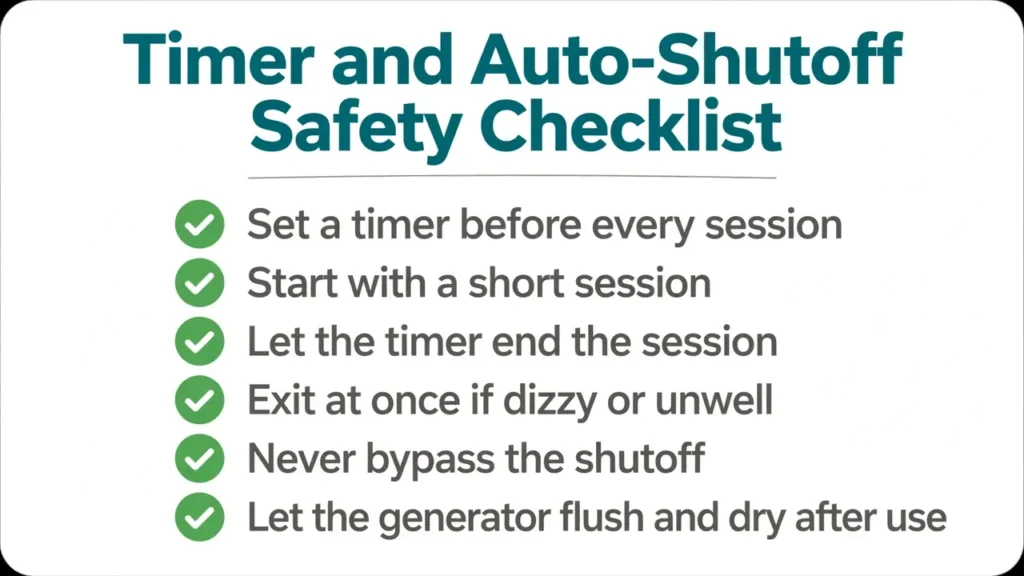
An adjustable timer is the better choice for most households. It lets a beginner set 10 or 15 minutes while an experienced user sets a longer session, and it lets parents set a short session for a teenager. Set the timer before every session, even when you only plan a quick steam. Our guide to how long to stay in a steam sauna explains how to build up session length safely.
The 24 hour timer option
A few controls offer a 24 hour timer option instead of the standard 60 minute timer. Amerec offers this on the K60 as an alternative configuration, adjustable in one hour steps from 1 to 24 hours. This is not meant for a 24 hour steam session. It is a delay and scheduling feature for commercial or shared settings, and it should only be used with a clear understanding of the manual. For a home steam room, a 60 minute maximum is the safer and more sensible limit.
Auto-Shutoff: The Safety Feature That Matters Most
Auto-shutoff is the feature that turns the generator off when the timer ends or when something goes wrong. It is not a luxury. It is the main guard against a generator running for hours because someone forgot it, and it is the feature you should check first on any control you buy.
Timer-based shutoff
Timer-based shutoff is the standard design. When the countdown reaches zero, the control stops the heating elements and the steam stops. On the Amerec K60, the unit turns off automatically in 60 minutes or less depending on the set time, and the control goes dark. On MrSteam’s iTempo, a 75 minute limiting safety backup sits behind the 60 minute electronic countdown, so the generator has a second layer of protection if the main timer fails.
Temperature-based shutoff
Good controls also watch the temperature sensor. If the sensor reads a temperature far above the set point, or if the sensor fails, the generator should shut down rather than keep heating. Amerec’s K60 adds a related feature called soft steam. Once the set temperature is reached, the control cuts steam production back to a single element for a softer flow, and both elements switch back on only if the room temperature drops by more than 5 degrees. This is a comfort feature, but it also shows how the control manages heat rather than running at full power without a break.
Low-water and overheat protection
Inside the generator, a water level control makes sure the heating elements stay covered with water. Running a heating element dry can damage the generator and create a fire risk, so most modern generators will not power the elements without a water level permissive signal. The MrSteam MS series, for example, uses an electronic water level control system and a built-in ASME safety valve for pressure regulation.
None of this removes your own responsibility. Auto-shutoff protects you if you forget, but it is not a reason to leave the steam running while you leave the house. Turn the steam off when you step out, and do not rely on the timer as your only safety plan.
Auto-Flush and Self-Cleaning: The Feature That Protects the Generator
Steam generators hold water, and standing water leaves mineral scale. In hard water areas, scale builds up fast and can shorten the life of the generator. This is where auto-flush systems come in.
MrSteam’s AutoFlush system introduces fresh water before use and drains the generator tank after each session. The idea is simple: the tank does not sit full of stale water between sessions. ThermaSol offers a similar feature called Auto PowerFlush, which you can run from the MicroTouch control or from the app on systems that support it.
Auto-flush helps, but it does not replace descaling. If your water is hard, you will still need to descale the generator on the schedule in the manual, and you may need a water treatment system. Our guide to steam generator maintenance, descaling and hard water care explains the routine in detail. A steam room is never maintenance free, and a control that flushes itself does not change that.
App Control for Steam Generators
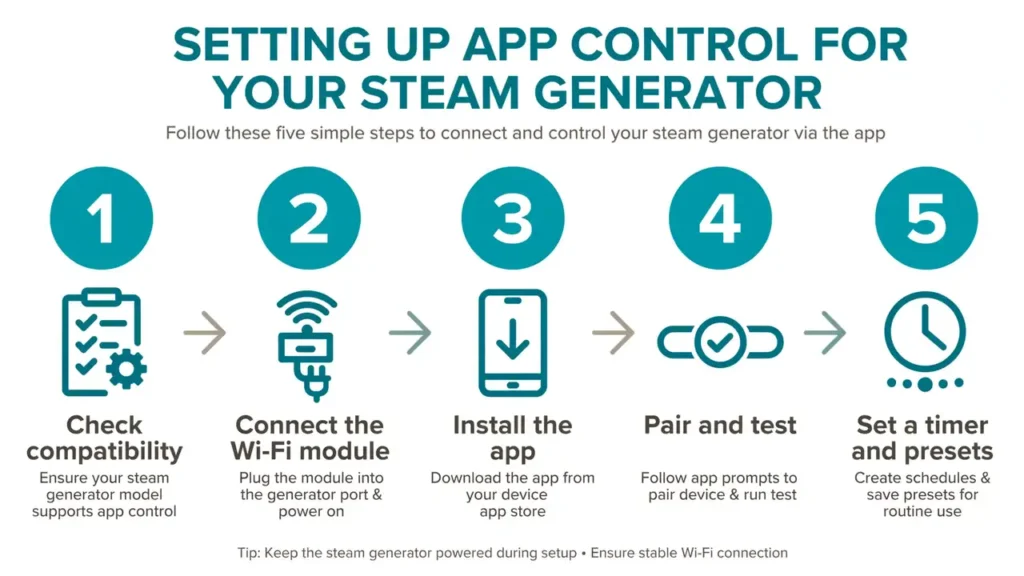
App control is the newest layer of steam control, and it is also the one with the most variation between brands. Some apps control the full system, while others only mirror the wall panel. Before you buy, check exactly what the app can do with your generator model, because an app that works with one series may not work with another.
What the apps can do
- Remote start: turn the steam on from another room so the shower is warm when you step in.
- Time and temperature: set the session length and temperature from your phone.
- Presets: save a profile for each person and recall it with one tap.
- Maintenance: run a flush cycle and check diagnostics on systems that support it.
- Extras: control lighting, music and aromatherapy on packages that include them.
MrSteam SteamLinx
MrSteam’s SteamLinx mobile app connects to iSteamX systems. It lets you control temperature and time settings, manage profiles, and use the AutoStart scheduling feature from your phone. The app works with the iSteamX control and hub, so it needs a compatible generator package. If you have an older iTempo control, check with MrSteam before assuming the app will work with it.
ThermaSol Solitude and ThermaTouch
ThermaSol launched the first mobile app for steam showers with its Solitude system, using a Wi-Fi module that connects ProSeries and AF Series generators to the home network. The app supports multiple users, remote activation of time and temperature from anywhere within the home Wi-Fi range, and access to diagnostic and maintenance features. The newer ThermaTouch control is an Android powered touchscreen that brings the same ideas onto the wall panel itself, with multiple user profiles, lighting and sound control, and in-shower app streaming.
Kohler and Amerec
Kohler sells steam generator controls for its own steam systems, and Amerec’s controls focus on reliable digital and touchscreen operation rather than phone apps. If app control matters to you, confirm the exact control and generator combination with the manufacturer or an authorized dealer before you buy, because app support varies by model year and series. Do not assume a new app will pair with an older generator.
Scheduling and Auto-Start: Warm Steam Waiting for You
A scheduled start is one of the most useful smart features. Instead of turning the steam on and waiting for the room to warm up, the control starts the generator at a set time so the shower is ready when you are.
MrSteam’s AutoStart feature on the iSteamX works this way. You can program up to eight start times, choosing the days of the week and the time of day. When AutoStart turns the steam on, it runs for only ten minutes, then asks you to press continue. If you do not press continue, the session stops and AutoStart turns itself off. This ten minute check is a deliberate safety design, and it is a good one.
The safety point matters. A steam generator that starts on a schedule and runs without anyone in the room wastes energy and water, and it can leave a wet room sitting warm and damp for hours if nobody shows up. A short confirmation window, like the ten minute rule, keeps a scheduled start from becoming an unattended session. If your control offers scheduling without a confirmation step, set the shortest session you can and keep the schedule to times you will actually use.
User Profiles and Presets
Saved profiles are a quiet convenience that makes a real difference in a shared bathroom. Instead of adjusting the temperature and time every session, each person taps their name and the control recalls their settings.
The details vary by brand. The MrSteam iSteamX supports eight user profiles with eight presets per profile. ThermaSol’s Signature Series saves settings for two users, and each user has a setting for regular shower use and one for steam use. The MicroTouch control also offers programmable presets that save five seconds after you make a change.
Profiles are also a safety tool in disguise. A parent can save a short, cooler session for a teenager and a longer one for themselves, so nobody has to remember the right numbers. Just remember that a preset is only as safe as the person who set it. Review saved profiles when the seasons change or when a new person starts using the steam room.
Passcode Locks and Child Safety
Touchscreen controls often include a passcode lock, and it is worth using. The MrSteam iSteamX offers passcode protection to prevent unintentional use, and its manual explains how to turn the password lock on from the system settings.
A passcode lock matters most in homes with children. A steam room is not a playroom, and a child who can start the steam on their own can get into trouble quickly. A locked control, plus a bathroom door that closes properly, is a simple layer of protection. Children should only use a steam room with an adult present, for a short session, and only if a doctor has said it is fine for them.
Also think about where the control is mounted. Most controls can be installed inside or outside the steam room. An outside control lets you start and stop the steam without stepping into the heat, which is useful for a parent or carer. An inside control is more convenient during the session but puts the panel in the wettest part of the room. Follow the manufacturer’s placement instructions, and never mount a control above or near the steam head, where direct steam can damage it or give a false temperature reading.
Brand Comparison: What Each Maker Offers
The table below pulls together the verified control features for the main steam generator brands, drawn from their own manuals and documentation. It is a starting point for comparison, not a buying verdict. Models change, and a feature listed here may belong to one series and not another, so verify the exact model before you buy.
| Brand and control | Timer | Auto-shutoff backup | App or smart features | Self-cleaning |
|---|---|---|---|---|
| MrSteam iTempo | Fixed 60 minutes, pause button | 75 minute limiting safety backup | None | AutoFlush on compatible generators |
| MrSteam iSteamX | Programmable 1 to 60 minutes | Temperature timed shutoff | SteamLinx app, AutoStart scheduling, 8 profiles | AutoFlush on compatible generators |
| ThermaSol MicroTouch | 45 minute timer | Timer shutoff | Programmable presets, CAN-bus control | Auto PowerFlush |
| ThermaSol Signature Series | Adjustable timer | Timer shutoff | Two user presets, light and music control | PowerFlush on compatible generators |
| ThermaSol ThermaTouch | Programmable timer | Timer shutoff | Android touchscreen, multiple profiles, app streaming | PowerFlush on compatible generators |
| Amerec K60 | Adjustable 60 minutes in 5 minute steps | Automatic shutoff at set time, soft steam mode | None, optional secondary control | None, manual descaling per manual |
What to Check Before You Buy a Smart Steam Control
A smart control is only useful if it works with your generator, your bathroom, and the people who will use it. Run through this checklist before you spend money.
- Generator compatibility: confirm the control works with your exact generator model and series. A control from one brand rarely works with another brand’s generator.
- Timer range: check the maximum session length and whether the timer is fixed or adjustable. A 60 minute maximum is the standard for home use.
- Auto-shutoff backup: ask whether a second safety timer exists behind the main timer, as on the MrSteam iTempo.
- Wi-Fi range: app control needs a reliable Wi-Fi signal at the generator and the control. A bathroom far from the router may need a Wi-Fi extender.
- Profiles: count the people who will use the steam room and check the control saves enough profiles.
- Passcode lock: if children use the bathroom, a passcode lock is worth having.
- Flush and descaling: check whether the generator has auto-flush and how often the manual says to descale it.
- Sensor placement: read the manual’s rules for where the temperature sensor and control must sit, and plan the wiring before the walls close.
If you are choosing a generator at the same time as the control, read our guide to steam generators for saunas first. It explains sizing and the main generator types, which decides which controls are even an option for your room.
Setting Up Smart Steam Controls Safely
Installation is where smart steam controls most often go wrong. The control itself is low voltage on many systems, but the generator it switches is not. Steam generators draw serious power and need a dedicated circuit, proper grounding, and a water supply with a drain.
Use licensed professionals
Have a licensed electrician wire the generator and a licensed plumber handle the water supply and drain. This is not a job for a confident DIYer, and local code may require permits for the work. Our guide to steam sauna electrical and plumbing requirements explains what the installation involves and what to ask your installer.
Plan the control location early
Decide where the control and the temperature sensor will sit before the tiling starts. The sensor must be in a spot that reflects the real bathing temperature, away from the steam head and away from cold drafts. The control cable runs from the generator to the panel, and on some systems it is a fixed length, so measure the route before you order. MrSteam, for example, supplies a 30 foot control cable with the iSteamX, with a longer 60 foot cable available as an option.
Connect the app and test everything
Once the wall panel works, set up the app before the installer leaves. Pair the phone, test a remote start, check that the timer ends the session, and run a flush cycle if your generator has one. Test the passcode lock too. It is much easier to fix a pairing problem while the installer is still on site than after the bathroom is finished.
Keep the room dry between sessions
Smart controls do not dry a steam room. After a session, leave the door open for a while, run the ventilation, and let surfaces dry. A steam room that stays damp grows mold, and no control feature prevents that. Ventilation and drying are part of the routine, not an optional extra. Our guide to steam shower drain and ventilation covers the setup that keeps a steam room healthy.
Common Problems and Fixes
Most smart control problems are simple, and the fix is usually in the manual. Here are the ones that come up most often.
The app will not connect
Check the Wi-Fi signal at the generator first. Bathrooms with tiled walls and a distant router are a common cause. Restart the Wi-Fi module and the phone, then try pairing again. If the app worked before and stopped, check whether the app or the phone software updated. ThermaSol’s own instructions say to test the system with the wall mounted control first, before attempting the Wi-Fi connection, so you know the generator itself is fine.
The timer ends the session too early
Check the timer setting before assuming a fault. On a fixed timer control, the session length is what it is, and the only fix is a different control. On an adjustable timer, make sure nobody changed the preset. If the control shuts off well before the set time, the temperature sensor may be reading wrong, and that is a job for the installer or the manufacturer, not a settings change.
The control shows the wrong temperature
A sensor mounted above or near the steam head will read hotter than the seat area, and a sensor in a draft will read colder. Check the mounting position against the manual. If the position is right and the reading is still wrong, the sensor itself may need replacing.
No steam at all
If the control lights up but no steam comes, the problem is usually the generator, the water supply, or a tripped breaker, not the control. Check the water supply is on and the breaker has not tripped, then work through our guide to a steam generator not producing steam. If the control itself is dark, check its power supply and cable connection before calling for service.
Steam Controls Are Not the Same as Infrared Controls
It is easy to confuse smart steam controls with smart infrared sauna controls, because both offer apps, timers, and remote start. The two systems work differently, and their safety features are not interchangeable. An infrared heater warms your body directly and runs dry, while a steam generator boils water and fills the room with hot, wet air. Steam controls manage water level, flushing, and condensation in ways an infrared panel never has to.
If you are comparing the two types of sauna for a bathroom remodel, the controls are only one part of the decision. The room build, ventilation, and maintenance are all different. What matters here is simple: buy a control made for your steam generator, follow its manual, and do not assume a feature from an infrared system works the same way on steam.
Key Takeaways
- The timer and auto-shutoff are the most important features on any smart steam control, and a backup safety timer is worth having.
- Adjustable timers, usually up to 60 minutes, suit most homes better than fixed timers, because each person can set a session that fits them.
- Auto-flush systems such as MrSteam AutoFlush and ThermaSol PowerFlush help with scale, but they do not replace descaling or drying the room.
- App control adds remote start, presets, and scheduling, but it needs a compatible generator and a solid Wi-Fi signal.
- Scheduled starts should include a short confirmation window, so the steam never runs unattended for long.
- Passcode locks protect children and stop accidental starts, and a control mounted outside the room is easier for a carer to use.
- Electrical and plumbing work belongs to licensed professionals, and local code and permit rules should be checked before installation.
Frequently Asked Questions
Do steam generators turn off automatically?
Yes, on any modern control. A timer ends the session when the set time runs out, and many generators add a second safety timer behind it. The MrSteam iTempo, for example, has a fixed 60 minute timer with a 75 minute limiting safety backup. Older or very basic units may differ, so check the manual for your model.
What is the longest a steam session should run?
Most home controls cap sessions at 60 minutes, and that is a sensible maximum. Beginners should start much shorter, often 10 to 15 minutes, and build up gradually. Leave the steam room at once if you feel dizzy, unwell, or overheated, even if the timer is still running.
Can I control my steam shower from my phone?
Yes, if your generator and control support it. MrSteam’s SteamLinx app works with iSteamX systems, and ThermaSol’s Solitude app works with compatible ProSeries and AF Series generators through a Wi-Fi module. Check your exact model first, because app support varies by series and model year.
Can I schedule my steam shower to start automatically?
Some smart controls offer this. MrSteam’s AutoStart lets you program up to eight start times, and it runs for ten minutes before asking you to press continue. If your control offers scheduling without a confirmation step, keep the scheduled session short and only schedule times you will actually use.
What is AutoFlush on a steam generator?
AutoFlush is MrSteam’s system that introduces fresh water before use and drains the generator tank after each session, so the tank does not sit full of stale water. ThermaSol offers a similar feature called Auto PowerFlush. Neither replaces descaling, which you still need to do on the schedule in the manual, especially in hard water areas.
Is a touchscreen control better than a push-button control?
A touchscreen adds profiles, a passcode lock, and a clearer display, which helps in a shared bathroom. A push-button or simple digital control is cheaper, simpler, and just as safe if it has a proper timer and auto-shutoff. Choose the control that fits your household, not the one with the most features.
Can children use a steam room with a smart control?
Children should only use a steam room with an adult present, for a short session, and only if a doctor has said it is fine for them. Use the passcode lock so a child cannot start the steam alone, and save a short, cooler preset for their sessions.
Do smart steam controls need Wi-Fi to work?
No. The wall control, timer, and auto-shutoff work without Wi-Fi. Wi-Fi is only needed for the phone app, remote start, and scheduling from your phone. If the Wi-Fi drops, you can still run the steam from the wall panel.
The Bottom Line
Smart steam controls are worth the money when they make a steam room safer and easier to use. A clear timer, a reliable auto-shutoff, and a passcode lock are the features that matter every day. App control, scheduling, and saved profiles are genuine conveniences, but they sit on top of those safety basics, and they should never replace them.
Before you buy, match the control to your exact generator, check the timer range and the safety backup, and make sure the Wi-Fi reaches the bathroom if you want app control. Have a licensed electrician and plumber do the installation, and read the manual for the model you own, because the details in this guide come from manufacturer documentation and vary by series. Running a steam room also costs money in power and water, so read our guide to the cost to run a steam sauna before you decide on a system. A control that fits your household, set up properly and used with a timer every time, is the simplest way to enjoy steam safely.
References
- MrSteam, MS-150-EC1 Steam Bath Generator user manual and iTempo control operating instructions (60 minute electronic countdown, 75 minute limiting safety backup, AutoFlush). manuals.plus
- MrSteam, XDream Generator Package instruction manual for iSteamX (AutoStart, passcode lock, profiles, temperature timed shutoffs). manualspro.net
- ThermaSol, MicroTouch Steam Shower Control product information (45 minute timer, Auto PowerFlush, user presets). peakprimalwellness.com
- ThermaSol, Solitude Wireless Wi-Fi Controller Module installation instructions (app control, User 1 and 2 presets, Auto PowerFlush). cdn4.servls.com
- Amerec, AK Series with K60 Control owners manual (adjustable 60 minute timer, 100 to 125 degrees Fahrenheit, soft steam, 24 hour timer option). manualshelf.com
- ThermaSol, ThermaTouch2 user interface announcement (Android powered smart control, multiple user profiles). thermasol.com